Create a Flutter app to check a leap year
In this blog post, we’ll walk through the process of building a simple Flutter app that check a leap year. We’ll use the Dart programming language and Flutter framework to create an interactive mobile application.
Table of Contents
- Step-by-Step Guide – check a leap year
- Understanding the Code
- Building the UI to check a leap year
- Conclusion
Step-by-Step Guide – check a leap year
Step 1: Create a New Flutter Project
Open your lib/main.dart file and replace its content with the following code:
Understanding the Code
Let’s break down the code step-by-step:
Main Function and MyApp Class
void main() {
  runApp(MyApp());
}

class MyApp extends StatelessWidget {
  @override
  Widget build(BuildContext context) {
    return MaterialApp(
      title: 'Leap Year Checker',
      home: LeapYearCheckerScreen(),
    );
  }
}- The
mainfunction is the entry point of the app, which callsrunAppto start the app. MyAppis a stateless widget that sets up theMaterialAppwith the title ‘Leap Year Checker’ and specifies theLeapYearCheckerScreenas the home screen.
LeapYearCheckerScreen Stateful Widget
class LeapYearCheckerScreen extends StatefulWidget {
  @override
  _LeapYearCheckerScreenState createState() => _LeapYearCheckerScreenState();
}

class _LeapYearCheckerScreenState extends State<LeapYearCheckerScreen> {
  final _controller = TextEditingController();
  String _result = "";
LeapYearCheckerScreen is a stateful widget that creates a state object _LeapYearCheckerScreenState._controller is a TextEditingController that manages the input from the user._result stores the result of the leap year check.
Leap Year Logic
bool isLeapYear(int year) {
  if (year % 4 == 0) {
    if (year % 100 == 0) {
      return year % 400 == 0;
    } else {
      return true;
    }
  } else {
    return false;
  }
}
isLeapYear function checks if the given year is a leap year based on the leap year rules.
Check a Leap Year Function
void _checkLeapYear() {
  setState(() {
    try {
      int year = int.parse(_controller.text);
      _result = isLeapYear(year) ? "Leap Year" : "Not a Leap Year";
    } catch (e) {
      _result = "Invalid Input";
    }
  });
}
_checkLeapYear function is called when the user clicks the ‘Check’ button. It parses the input year and updates _result accordingly.
Building the UI to check a leap year
import 'package:flutter/material.dart';

void main() {
  runApp(MyApp());
}

class MyApp extends StatelessWidget {
  @override
  Widget build(BuildContext context) {
    return MaterialApp(
      title: 'Leap Year Checker',
      home: LeapYearCheckerScreen(),
    );
  }
}

class LeapYearCheckerScreen extends StatefulWidget {
  @override
  _LeapYearCheckerScreenState createState() => _LeapYearCheckerScreenState();
}

class _LeapYearCheckerScreenState extends State<LeapYearCheckerScreen> {
  final _controller = TextEditingController();
  String _result = "";

  bool isLeapYear(int year) {
    if (year % 4 == 0) {
      if (year % 100 == 0) {
        return year % 400 == 0;
      } else {
        return true;
      }
    } else {
      return false;
    }
  }

  void _checkLeapYear() {
    setState(() {
      try {
        int year = int.parse(_controller.text);
        _result = isLeapYear(year) ? "Leap Year" : "Not a Leap Year";
      } catch (e) {
        _result = "Invalid Input";
      }
    });
  }

  @override
  Widget build(BuildContext context) {
    return Scaffold(
      appBar: AppBar(
        title: Text('Leap Year Checker'),
      ),
      body: Padding(
        padding: const EdgeInsets.all(20.0),
        child: Column(
          mainAxisAlignment: MainAxisAlignment.center,
          children: [
            TextField(
              controller: _controller,
              keyboardType: TextInputType.number,
              decoration: InputDecoration(
                labelText: 'Enter a year',
              ),
            ),
            SizedBox(height: 20),
            ElevatedButton(
              onPressed: _checkLeapYear,
              child: Text('Check'),
            ),
            SizedBox(height: 20),
            Text(
              _result,
              style: TextStyle(fontSize: 20),
            ),
          ],
        ),
      ),
    );
  }
}
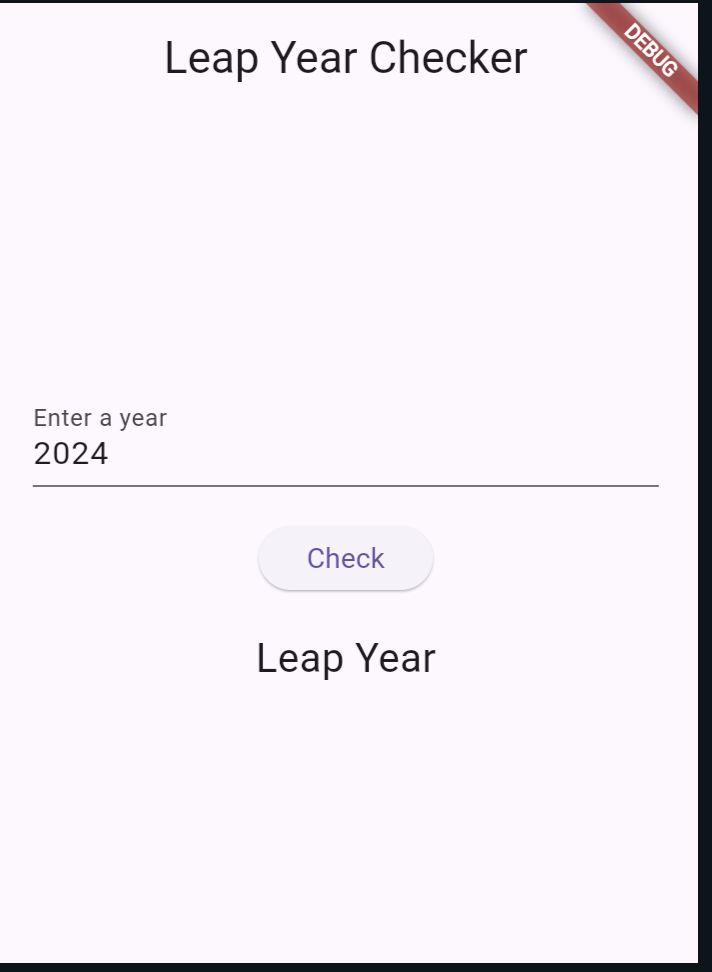
The build method creates the UI of the app, including a TextField for user input, an ElevatedButton to trigger the check and a Text widget to display the result.
Output:
Also Read:
Conclusion
In this blog post, we built a simple Flutter app that checks if a given year is a leap year. We covered the basics of creating a Flutter project, setting up the UI, and implementing the logic for leap year checking. Flutter makes it easy to build beautiful and functional mobile applications with minimal effort.

About Ambika Dulal
Lead Mobile App Developer and Tech Consultant specializing in Flutter, Dart, and Firebase.