Check if Linked list is Palindrome in Flutter

In this blog post, we’ll explore how to Check if Linked list is Palindrome in Flutter number using Dart and Flutter. A linked list is a data structure where elements are stored in nodes, and each node points to the next node. A palindrome number is a number that reads the same backward as forward.
Table of Contents
- Why learn to Check if Linked list is Palindrome in Flutter
- The Project – Check if Linked list is Palindrome
We’ll build a Flutter application to input a sequence of numbers, represent it as a linked list, and check if the sequence forms a palindrome. This exercise will help you understand data structures and algorithms while working with Dart and Flutter.
Why learn to Check if Linked list is Palindrome in Flutter
- Data Structures: Linked lists are fundamental data structures, and understanding them is crucial for solving complex problems.
- Algorithmic Thinking: Checking for palindromes involves algorithmic thinking, including reversing sequences and comparing them.
- Flutter Development: This exercise will enhance your skills in Flutter, particularly in creating interactive UIs and managing state.
The Project – Check if Linked list is Palindrome
First, ensure you have Flutter installed. If not, follow the official Flutter installation guide.
Create a new Flutter project:
flutter create linked_list_palindrome
cd linked_list_palindrome
Replace the contents of lib/main.dart with the following code:
import 'package:flutter/material.dart';

void main() {
  runApp(MyApp());
}

class MyApp extends StatelessWidget {
  @override
  Widget build(BuildContext context) {
    return MaterialApp(
      title: 'Linked List Palindrome Checker',
      home: PalindromeCheckerScreen(),
    );
  }
}

class Node {
  int data;
  Node? next;

  Node(this.data);
}

class LinkedList {
  Node? head;

  void append(int data) {
    if (head == null) {
      head = Node(data);
    } else {
      Node current = head!;
      while (current.next != null) {
        current = current.next!;
      }
      current.next = Node(data);
    }
  }

  bool isPalindrome() {
    if (head == null) return true;

    Node? slow = head, fast = head;
    List<int> stack = [];

    while (fast != null && fast.next != null) {
      stack.add(slow!.data);
      slow = slow.next;
      fast = fast.next!.next;
    }

    if (fast != null) {
      slow = slow!.next;
    }

    while (slow != null) {
      int top = stack.removeLast();
      if (top != slow.data) {
        return false;
      }
      slow = slow.next;
    }
    return true;
  }
}

class PalindromeCheckerScreen extends StatefulWidget {
  @override
  _PalindromeCheckerScreenState createState() =>
      _PalindromeCheckerScreenState();
}

class _PalindromeCheckerScreenState extends State<PalindromeCheckerScreen> {
  final TextEditingController _controller = TextEditingController();
  String _result = "";
  LinkedList _linkedList = LinkedList();

  void _checkPalindrome() {
    setState(() {
      List<String> inputs = _controller.text.split(',');
      _linkedList = LinkedList();
      for (var input in inputs) {
        _linkedList.append(int.parse(input.trim()));
      }
      _result = _linkedList.isPalindrome() ? "Palindrome" : "Not a Palindrome";
    });
  }

  @override
  Widget build(BuildContext context) {
    return Scaffold(
      appBar: AppBar(
        title: Text('Linked List Palindrome Checker'),
      ),
      body: Padding(
        padding: const EdgeInsets.all(20.0),
        child: Column(
          mainAxisAlignment: MainAxisAlignment.center,
          children: [
            TextField(
              controller: _controller,
              decoration: InputDecoration(
                labelText: 'Enter numbers separated by commas',
              ),
              keyboardType: TextInputType.number,
            ),
            SizedBox(height: 20),
            ElevatedButton(
              onPressed: _checkPalindrome,
              child: Text('Check'),
            ),
            SizedBox(height: 20),
            Text(
              _result,
              style: TextStyle(fontSize: 20),
            ),
          ],
        ),
      ),
    );
  }
}- Node Class: Represents each node in the linked list, containing data and a pointer to the next node.
- LinkedList Class: Manages the linked list, with methods to append data and check if the list is a palindrome. The
isPalindromemethod uses a stack to compare the first half of the list with the reversed second half.
PalindromeCheckerScreen Stateful Widget
class PalindromeCheckerScreen extends StatefulWidget {
  @override
  _PalindromeCheckerScreenState createState() =>
      _PalindromeCheckerScreenState();
}

class _PalindromeCheckerScreenState extends State<PalindromeCheckerScreen> {
  final TextEditingController _controller = TextEditingController();
  String _result = "";
  LinkedList _linkedList = LinkedList();

  void _checkPalindrome() {
    setState(() {
      List<String> inputs = _controller.text.split(',');
      _linkedList = LinkedList();
      for (var input in inputs) {
        _linkedList.append(int.parse(input.trim()));
      }
      _result = _linkedList.isPalindrome() ? "Palindrome" : "Not a Palindrome";
    });
  }

  @override
  Widget build(BuildContext context) {
    return Scaffold(
      appBar: AppBar(
        title: Text('Linked List Palindrome Checker'),
      ),
      body: Padding(
        padding: const EdgeInsets.all(20.0),
        child: Column(
          mainAxisAlignment: MainAxisAlignment.center,
          children: [
            TextField(
              controller: _controller,
              decoration: InputDecoration(
                labelText: 'Enter numbers separated by commas',
              ),
              keyboardType: TextInputType.number,
            ),
            SizedBox(height: 20),
            ElevatedButton(
              onPressed: _checkPalindrome,
              child: Text('Check'),
            ),
            SizedBox(height: 20),
            Text(
              _result,
              style: TextStyle(fontSize: 20),
            ),
          ],
        ),
      ),
    );
  }
}- TextEditingController: Manages the text input by the user.
- _checkPalindrome Function: Splits the input string by commas, converts each part to an integer, appends it to the linked list, and sets the result based on whether the list is a palindrome.
- build Method: Builds the UI with a
Scaffoldcontaining anAppBar, aTextFieldfor input, a button to check the palindrome, and aTextwidget to display the result.
Running the App
To run the app, use the following command:
flutter runThis will launch the Linked List Palindrome Checker app on your connected device or emulator.
Also Read:
Output:
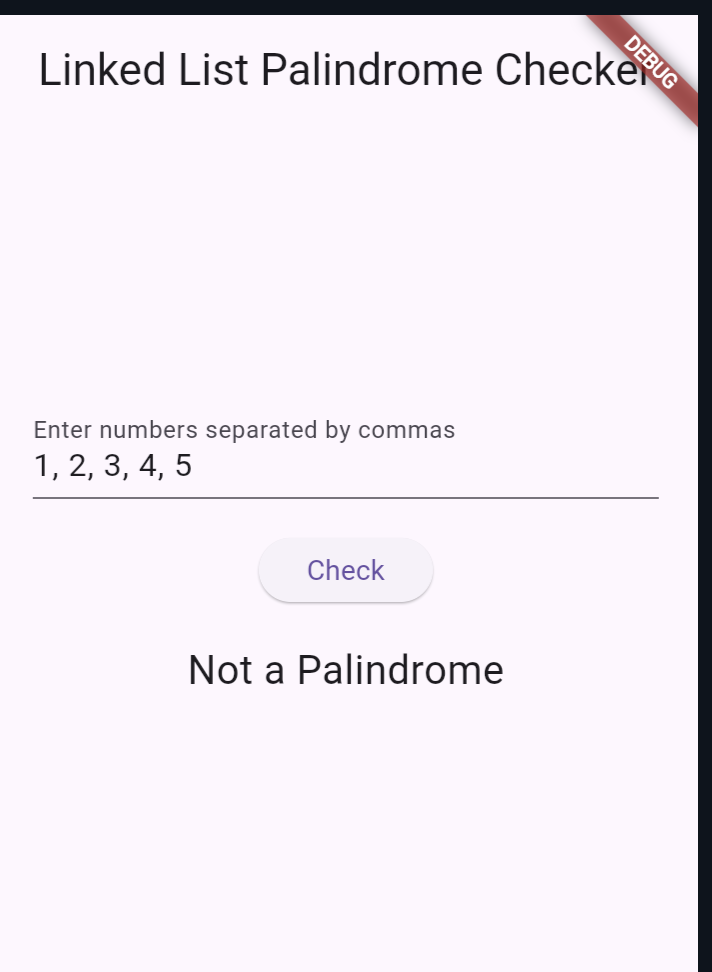
Checking if a linked list is a palindrome in Flutter and Dart is a great way to deepen your understanding of data structures, algorithms, and Flutter development.

About Ambika Dulal
Lead Mobile App Developer and Tech Consultant specializing in Flutter, Dart, and Firebase.